1. Enable the continuation before the result
- Open Settings. In the full release, the developer says Settings is available from the title screen.
- Turn on Extended Mode. This enables a later continuation choice; it does not immediately start a separate mode.
- Finish a run with ten badges. At the winning result, choose the option to continue that run into Extended Mode.
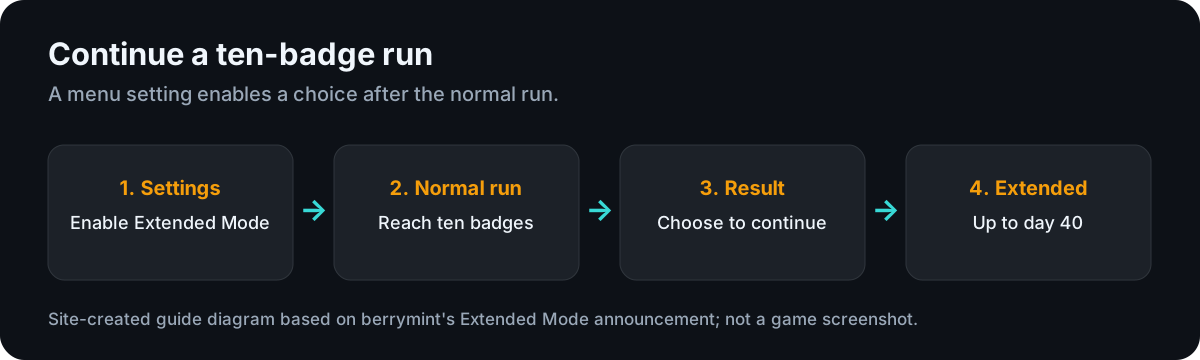
berrymint introduced the Settings switch and ten-badge continuation in its official Extended Mode update (opens an external site). The September 1.1.0 notes also confirm that Settings opens from the title screen.
2. If you do not see Extended Mode
First look in Settings rather than the Casual and Ranked selection. If you already reached ten badges without enabling it, turn the setting on and look for the continuation choice at the result of a subsequent run. The documented action is an opt-in choice at a winning result, not an automatic extension of every run.
Check which version you are using. The current build of berrymint's itch.io browser demo has not been verified here, so this page cannot promise identical menus there. The platform guide explains the browser-demo boundary. If the setting or continuation still does not appear in an updated full release, record your platform and version for official support; this site has not reproduced that case.
3. Extended does not mean infinite
The developer's announcement sets the continuation limit at day 40. It answers the common “how do I play past ten badges?” question, but it does not make a run endless. Avoid treating older demo guides or claims about extra ranked points as current full-release rules without checking the installed version.
If continuing an Extended run freezes on a black screen with a very large trinket bag, the symptom guide identifies the precise fix listed in patch 1.1.0 and the support route for a continuing case.