Where to Play Batomon Showdown Right Now
Looking to try Batomon Showdown without installing anything, or wondering whether to buy the complete release on Steam? Here is the verified breakdown of where the game runs today, which official destination fits your device, and why the browser demo should not be assumed to match the full game’s current rules.
Play Official Browser Demo
Developer-hosted HTML5 demoDeveloper berrymint lists an HTML5 demo with a “Run game” entry on itch.io. A permitted third-party playable embed has not been verified, so this button opens the developer’s page in a requested new window or browser tab. The demo’s current runtime has not been tested here.
Opening the demo requests a separate browser window. Your browser may use a new tab instead; the link still points to berrymint’s official itch.io page.
The developer calls the itch.io version a demo. An April 2026 devlog mentioned web_v0.3.0, but that does not prove the version running today. Its current roster, save compatibility, and full-release patch parity are unverified; check the build before applying full-release advice.
Choose the Official Version That Fits Your Device
These are the official destinations and the limits each listing actually confirms. The browser demo’s current features and save behavior have not been independently tested here:
| Player task | Developer browser listing | Full release / confirmed boundary |
|---|---|---|
| Full desktop game | Not the itch.io demo | Paid Windows release on Steam; launched September 15, 2026. |
| Android game | Not established by this browser listing | berrymint's Google Play listing (opens an external site); availability and price vary by region and device. |
| Browser tryout | berrymint labels its HTML5 “Run game” page a demo. | Do not treat the browser demo as the current full game or assume version parity. |
| Older Steam demo | A separate Season 0 Steam demo ended September 14, 2026. | The developer’s itch.io demo page remains listed; its current runtime is untested here. |
Core Gameplay Systems Explained
Batomon Showdown combines roguelike team management with automated combat resolution. Whether you are playing the demo or the full game, understanding the shop economy and battlefield formation is essential.
1. The Shop & Team Builder
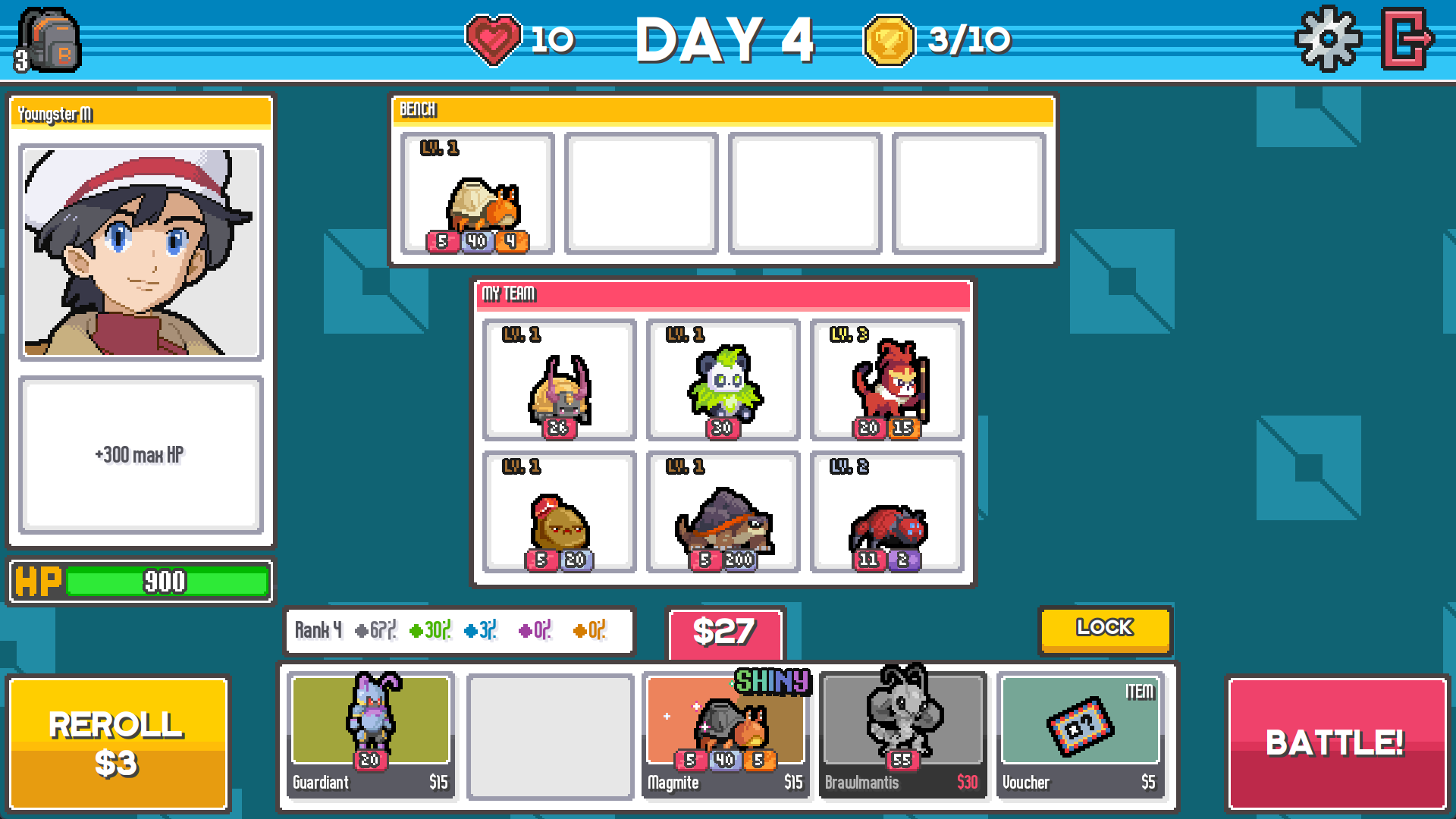
The shop and bench are where you review a team before its automatic battles. The developer’s older screenshot below illustrates the layout, not current prices or odds.
- Team slots: Arrange the Batomon you want to bring into battle.
- Bench: Keep units outside the active team while planning changes.
- Shop information: Check the currently installed game for live costs and odds; this screenshot may show older values.
2. Field Placement & Skill Triggers
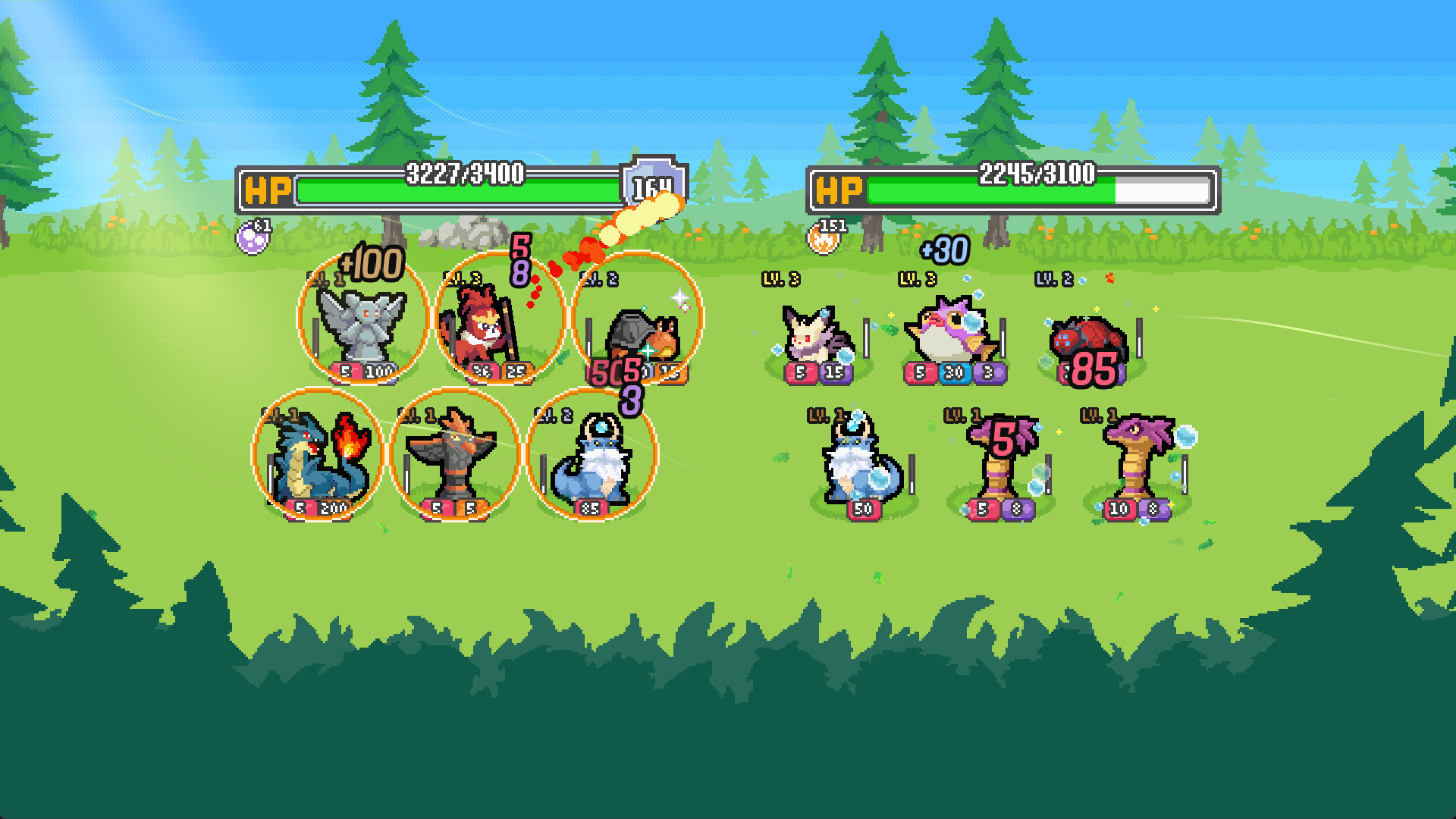
Battles resolve automatically once you press the "Battle!" button. Positioning determines attack targets and aura synergy benefits.
- Team Auras & Shields: Certain monsters generate group barriers (such as the yellow shield aura absorbing incoming hits).
- Elemental Spell Projectiles: Abilities fire on individualized cooldown timers, applying Burn, Stun, or direct damage numbers.
- Battle recap: The full release notes describe a recap that counts how often each Batomon casts.
Frequently Asked Questions
Can I play on Mac or Linux?
Steam lists Windows requirements. The October 6 developer notes report a startup fix for Windows under Parallels on a Mac; this does not announce a native Mac build or guarantee performance. The itch.io HTML5 demo has not been tested here on a particular Mac or Linux device. See the startup version check for that specific Windows case.
Is there an iOS or Android app?
berrymint publishes Batomon Showdown on Google Play for Android. We have not found an official iOS release listing. Browser demo controls on a particular phone have not been tested here.
Does the web demo save carry over to Steam?
berrymint’s full-release announcement (opens an external site) says the Android game can use the same account as PC runs. That does not establish any save transfer from the separate itch.io browser demo. Confirm with berrymint before relying on a browser run carrying over.
Connection, sign-in or save problem?
Start with your platform and installed version. Our symptom and support guide separates the developer’s listed fixes from issues that still need official help.
Where can I see the latest balance changes?
Our 1.3.0 older-guide checklist separates changes that were reversed from assumptions still out of date. The 1.1.0 comparison remains available as a historical checkpoint.
How do I keep playing past ten badges?
Extended Mode is enabled in Settings and offers a continuation after a ten-badge result. Follow the Extended Mode steps and day-40 limit before starting another run.